 By Caleb Morgan
Updated November 2026
An oscillating multi tool Worx model lets you cut, sand, scrape and grind in tight spaces where a standard saw or sander can’t reach. This guide walks you through how the tool works, how to pick the right accessories for the job, and the setup and technique steps that keep your cuts clean and your blades from wearing out early. By the end, you’ll know how to match a Worx oscillating multi tool to your projects and use it with confidence.
What an Oscillating Multi Tool Worx Model Does Well
An oscillating multi tool moves its accessory back and forth through a very small arc, typically a few degrees, rather than spinning it in a full circle. That short motion is what makes the tool useful for flush cuts against walls, trimming door casings, and working inside corners. Worx sells oscillating tools in several configurations, so the first step is to confirm whether the model you’re considering runs on a corded motor or a battery pack, and what quick-change system it uses for blades.
Shopping for one? See our guide: Cordless Oscillating Multi Tool Dewalt vs Milwaukee: Which Should You Choose?.
Owners often report that the tool earns its place in jobs like removing old grout, scoring and cutting flooring, and sanding small curved surfaces. It is less suited to long straight rip cuts or heavy stock removal, where a circular saw or reciprocating saw is faster. If you’re still deciding what the category covers, What Is an Oscillating Multi Tool Used For? Common Jobs and How to Start gives a broader overview.
Choosing the Right Worx Model and Accessories
Before you buy, compare three things: power source, speed control and blade interface. Corded models give steady power for long sessions. Battery models trade some sustained torque for portability, which matters if you’re working on a ladder or away from an outlet. Variable speed lets you slow the tool down for plastics, tile and delicate wood, and speed up for metal and hard materials.
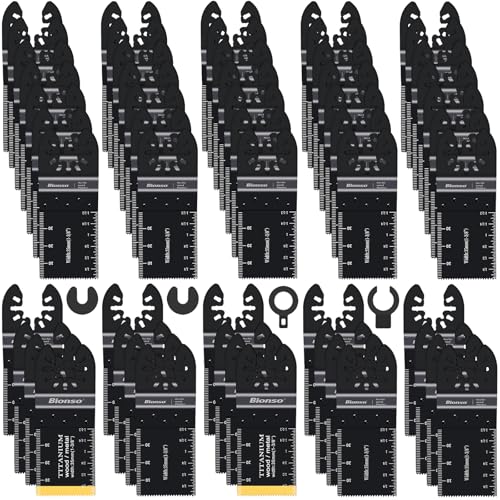
Check the blade attachment system before buying accessories. Many oscillating tools use a universal quick-release or a tool-free clamp, but blade shank styles are not always interchangeable across brands. Confirm the shank type and blade dimensions listed in the manufacturer’s manual, and buy a starter kit that covers the work you do most.
Common Blade Types and Their Uses
| Blade type | Best for | Avoid using it on |
|---|---|---|
| Bi-metal plunge blade | Wood with nails, general cutting | Hardened tile or masonry |
| Carbide grit blade | Grout, tile, cement board | Soft wood where a fine finish matters |
| Hook blade | Flush cuts in drywall and trim | Plunge cuts into solid material |
| Sanding pad | Curved and tight surfaces | Heavy stock removal |
| Scraper blade | Adhesive, caulk and paint removal | Finish work on softwood |
For a deeper look at blade selection, see Oscillating Multi-Tools: Blades, Plunge Cuts and Sanding Attachments and Oscillating Multi Tool Bits: How to Choose and Use the Right One.
Step-by-Step: Setting Up Your Worx Oscillating Tool
Good results start before the motor runs. Follow these steps each time you change the job:
- Unplug the corded model or remove the battery pack.
- Inspect the blade for cracks, chipped teeth or a bent shank. Replace any blade that shows damage.
- Release the quick-change clamp and seat the blade fully, then tighten according to the manual. A loose blade vibrates and cuts unevenly.
- Set the speed dial. Use a lower setting for plastics, tile and finish sanding, and a higher setting for wood and metal.
- Wear eye protection and hearing protection. Add a dust mask when cutting grout, cement board or sanding painted surfaces.
- Clamp or hold the workpiece firmly. Never hold a small piece freehand while cutting.
Checklist: Before You Start Cutting
- Blade type matches the material
- Blade is fully seated and tightened
- Speed setting is appropriate for the material
- Workpiece is clamped or supported
- No wires, pipes or hidden fasteners in the cut path
- Eye and hearing protection are on
Cutting Technique for Clean Results
Let the blade do the work. Pressing hard does not speed the cut; it overheats the blade, dulls the teeth and can deflect the tool off line. Start the motor before the blade touches the material, and keep the blade flat against the surface when you begin a plunge cut.
Making a Plunge Cut
Plunge cuts start in the middle of a board or sheet rather than at an edge. Tilt the tool so only the front tip of the blade contacts the material, switch the tool on, then slowly lower the blade until it sits flat. Advance slowly along your marked line. For a more detailed walkthrough, read How to Make Plunge Cuts with an Oscillating Multi-Tool.
Sanding and Scraping
For sanding, keep the pad moving across the surface rather than dwelling in one spot, which can burn wood or leave swirl marks. Work from coarser to finer grit. Oscillating Multi Tool Sanding: A Step-by-Step Guide for Beginners covers grit progression in more detail.
Removing Grout
Grout removal is one of the most common uses for an oscillating tool. Use a carbide grit blade, set the speed moderately, and keep the blade in the joint without tilting it into the tile edge. Oscillating Multi Tool for Grout Removal: 5 Steps to Clean Joints Fast walks through the full process.
Common Mistakes and Tips
- Using a wood blade on metal or masonry. The teeth will skip or break. Match the blade to the material every time.
- Skipping the speed adjustment. High speed on plastic causes melting; low speed on hardwood slows the cut and wears the blade.
- Overtightening or undertightening the blade. Follow the torque or tightness guidance in your manual.
- Forcing the cut. Let the oscillation carry the blade. Excess pressure shortens blade life.
- Ignoring hidden hazards. Check for wiring and plumbing before cutting into walls or floors.
If you’re weighing a Worx model against other platforms, Milwaukee M12 Fuel Oscillating Multi-tool: How to Choose and Use One Well and Oscillating Multi Tool DeWalt: How to Choose and Use One (2026) offer useful points of comparison.
Recommended gear
- Assorted bi-metal and carbide blade kit. A starter set covering wood, metal and grout lets you handle most household jobs without buying blades one at a time. View on Amazon
- Safety glasses with side shields. Blade fragments and grout dust can reach your eyes from the side, so side protection matters. View on Amazon
- Dust mask rated for fine particles. Grout, drywall and cement dust are easy to inhale during extended cutting. View on Amazon
- Clamp for holding workpieces. A bench clamp keeps small pieces steady for accurate plunge and flush cuts. View on Amazon
FAQ
Can a Worx oscillating multi tool cut metal?
Yes, when fitted with a metal-cutting bi-metal blade and run at a suitable speed. Thin sheet metal, nails and screws in wood are the most practical targets. Thick steel is better handled by a dedicated metal saw.
What speed should I use for tile?
Use a lower speed setting with a carbide grit blade and let the abrasive grit remove material slowly. High speed generates heat and can crack glazed tile.
How long do oscillating blades last?
Lifespan depends on material, speed and technique. Blades cutting nails or grout wear faster. Replace a blade when cuts slow noticeably, the teeth look rounded, or the blade overheats.
Do I need a special blade for each brand?
Not always, but shank styles vary. Check the manual or the packaging for compatibility before buying, since a blade that fits one quick-change system may not fit another.
Is an oscillating tool safe for beginners?
It is reasonably approachable if you use the right blade, secure the workpiece and wear eye protection. For work involving gas lines, live electrical circuits or structural members, consult a licensed professional before cutting.
Can I sand wood with an oscillating tool?
Yes. A sanding pad attachment works well for corners, edges and detail areas. It is slower than an orbital or belt sander on large flat panels.
How do I avoid burning the material?
Reduce speed, lighten your pressure, keep the blade moving, and take breaks if the blade feels hot to the touch. Dull blades generate more heat, so replace them when cutting slows.
Conclusion
An oscillating multi tool Worx model is most valuable for precise, close-quarters work: flush cuts, grout removal, detail sanding and plunge cuts in materials that other saws can’t handle comfortably. Choose the power source and blade system that suit your projects, keep a matched set of blades on hand, and set the speed for each material. With those habits in place, the tool becomes one of the most versatile items in a home workshop.
Ready to choose one?
About Caleb Morgan
Caleb Morgan is part of our editorial team and reviews and edits our power tools guides, checking product details against manufacturer specifications and owner feedback.