 By Emily Parker
Updated November 2026
A cordless impact driver 1/4 is a compact tool that drives screws and lag bolts using a hex collet that accepts 1/4-inch hex shank bits. This guide explains what the 1/4-inch hex size means, how to choose a driver for your work, and how to run it safely and accurately so you get tight, clean fastening every time.
What the 1/4-Inch Hex Size Means
The “1/4” in a cordless impact driver 1/4 refers to the size of the collet, the spring-loaded chuck that holds the bit. Most driver bits use a 1/4-inch hex shank, which is the standard for impact drivers. Because the collet is a quick-release design, you can swap bits in one motion, and the bit locks in place during use. Drill chucks, by contrast, usually clamp round shanks and are not built for the torque pulses an impact driver delivers, so bits designed for impact work should always be used in this type of tool.
Shopping for one? See our guide: 4 Best Cordless Impact Drill Driver Picks of 2026.
Keep in mind that the 1/4-inch size describes the bit interface, not the power of the tool. Voltage, torque ratings and motor design vary widely between models, so compare those specs alongside the collet size when you shop.
How to Choose the Right Driver
Start with the battery platform you already own. Impact drivers are sold as bare tools or as kits, and a bare tool only makes sense if you already have compatible batteries and a charger. Next, check the maximum torque the manufacturer specifies and the speed settings, since a driver with variable speed and a dedicated low-speed setting gives you more control on delicate work. Finally, consider weight and length. A shorter, lighter tool is easier to use in tight corners and overhead, while a heavier model can drive long lag bolts with less effort.
- Battery platform you already own, or a complete kit if you are starting fresh
- Manufacturer-specified maximum torque, matched to your typical fasteners
- Variable speed trigger and a low-speed or control setting
- Weight and overall length for your typical work spaces
- LED work light and a belt clip for convenience
Step-by-Step: Using a Cordless Impact Driver 1/4 Safely
Step 1: Insert the Bit
Pull back the collar on the collet, push the impact-rated bit fully into the socket until it clicks, then release the collar. Give the bit a light tug to confirm it is locked. A bit that is not fully seated can slip and cause damage or injury.
Step 2: Set the Clutch or Mode
Choose the mode that suits the job. Use a low speed for seating screws in soft wood or drywall, and a higher speed for longer fasteners in structural material. Many drivers also offer a reverse setting for removing fasteners, so check the switch before you start.
Step 3: Position and Drive
Hold the tool square to the work surface and keep your wrist straight. Start the fastener slowly, then increase pressure and speed. Let the tool do the work rather than leaning hard on it, and stop as soon as the fastener is flush or the head is seated.
Tools and Accessories You Will Need
- A cordless impact driver 1/4 with a fully charged battery
- Impact-rated driver bits in the sizes your fasteners require
- Safety glasses and hearing protection for longer sessions
- A bit holder or magnetic tip for starting screws one-handed
- Depth-stop accessories if you drive into finished surfaces
Common Mistakes to Avoid
- Using standard drill bits, which can shatter in an impact tool
- Pressing too hard, which can cam out the screw head and strip it
- Driving into finished wood without a pilot hole or depth control
- Ignoring the speed setting and running full power on small screws
- Skipping a bit-lock check, which can let the bit slip mid-drive
For a deeper look at avoiding damage, see How to Use an Impact Driver Without Stripping Screws and Impact-Rated vs Standard Driver Bits.
Recommended Gear
- Milwaukee M18 Fuel 1/4 Hex Impact Driver is a widely sold option known for its brushless motor and compact body. View on Amazon
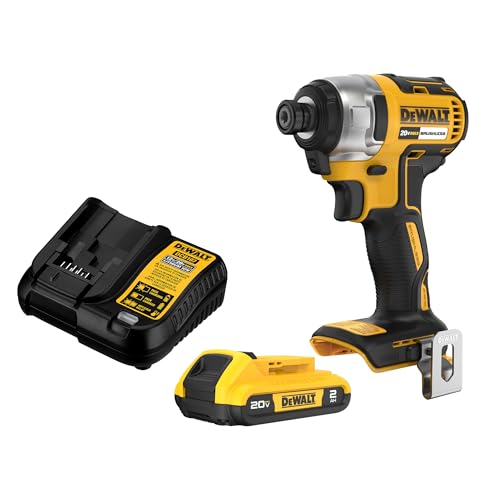
- DeWalt DCF887B 20V MAX XR Impact Driver offers a compact design and variable speed control. View on Amazon
- Ryobi P235 One+ HP Brushless Impact Driver is a budget-friendly pick for homeowners already in the Ryobi battery system. View on Amazon
FAQ
What is a cordless impact driver 1/4 used for?
It drives screws, lag bolts and similar fasteners quickly, especially in framing, decking, cabinetry and general home repair. The rotational impacts help drive fasteners without as much pressure from the user.
Can I use a regular drill bit in an impact driver?
It is not recommended. Standard bits can break under impact loads. Use bits labeled impact-rated for the 1/4-inch hex collet.
What does the 1/4 in 1/4 cordless impact driver mean?
It refers to the 1/4-inch hex collet that holds the bit. It describes the bit interface, not the tool’s power.
Is a 1/4 impact driver the same as an impact wrench?
No. Impact drivers use a bit interface for screws, while impact wrenches use square drive sockets for nuts and bolts. Check the manufacturer’s specifications for the intended use.
How do I stop an impact driver from stripping screws?
Use the correct bit size, start at low speed, keep the tool square, and reduce pressure as the screw seats. See How to Use an Impact Driver Without Stripping Screws for more detail.
Conclusion
A cordless impact driver 1/4 is a fast, capable tool once you understand its hex collet, bit requirements and speed control. Choose a model that matches your battery platform and typical fasteners, use impact-rated bits, and work with steady pressure. Check the manufacturer’s manual for safety guidance before using any power tool.
Ready to choose one?
About Emily Parker
Emily Parker is part of our editorial team and reviews and edits our power tools guides, checking product details against manufacturer specifications and owner feedback.